
Handling PII in Your Logs
Where PII can be handled in a log pipeline (client side, at ingest, in storage), what you can do with it, and how Oodle helps at each step.

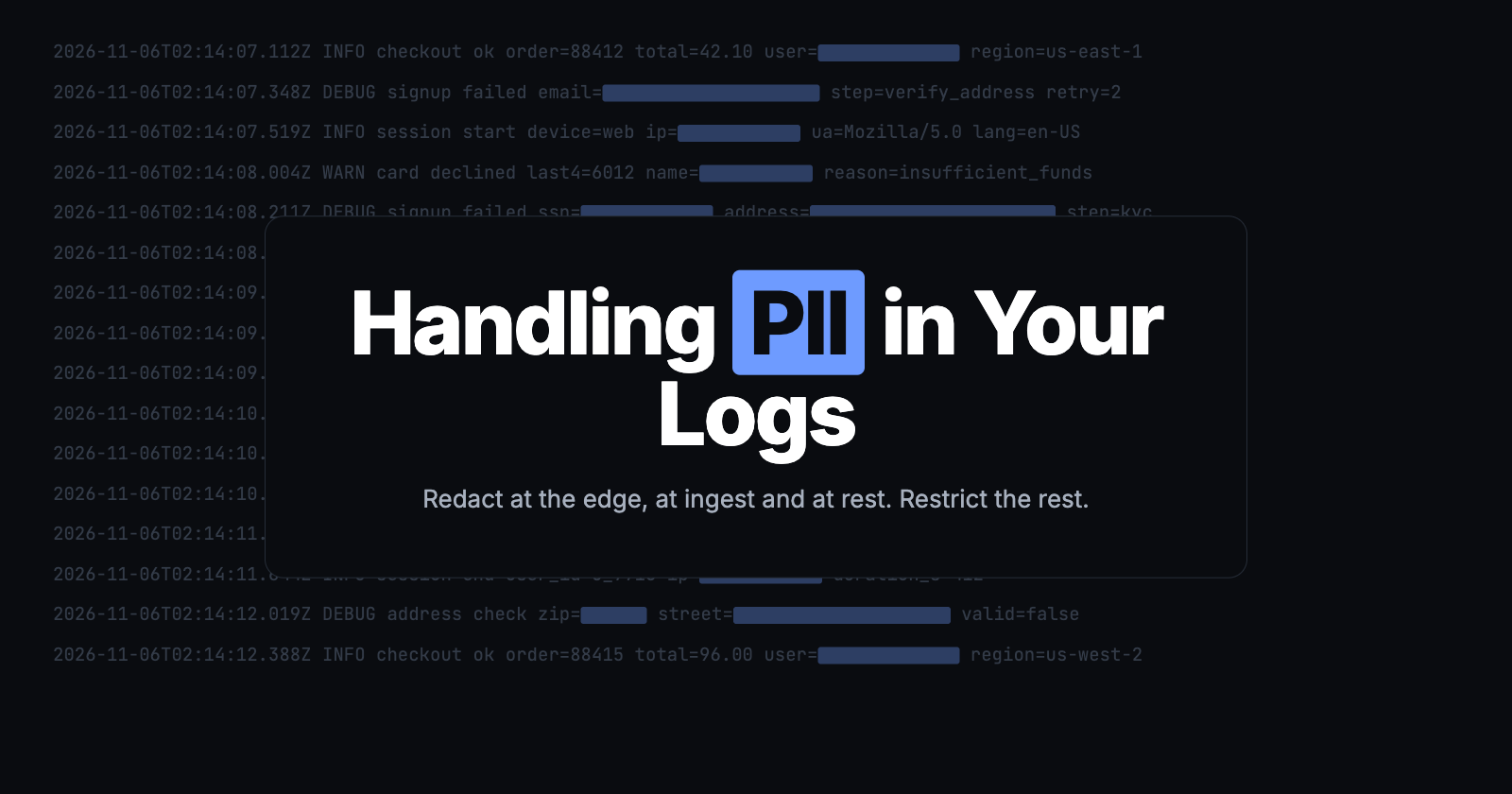
• PII gets into logs by mistake, through a debug line or a new region. Sometimes a team keeps it on purpose.
• Each of those needs a different control: redact at the edge, redact in the ingest pipeline, fix the data at rest, or restrict access.
• Oodle gives you all four controls.
PII, or personally identifiable information, is any data that can point to a real person. In logs, the common examples are names, email addresses, phone numbers, card numbers, national ID numbers such as a US SSN, IP addresses and session tokens.
PII gets into logs for many reasons. Most times it is a mistake. Sometimes a team keeps it on purpose, because it needs the data. Each reason needs a different control. To show them, this post follows Pinecart, a fictional online store.
A debug line. Pinecart has a sign-up flow with many steps, and sometimes a sign-up fails. To find out why, a developer added a debug log line some time ago:
log.debug("signup failed", "user", user)The developer did not think about what user holds. It is an object with all the attributes of the user. One night, sign-ups start to fail, and the on-call engineer turns on debug logs. Now each failed sign-up writes a line like this:
DEBUG signup failed user={"name":"Jane Doe","email":"jane.doe@example.com","address":"12 Main St, Austin, TX","ssn":"123-45-6789","ip":"203.0.113.7"}The engineer fixes the bug, and the debug logs stay on. Nobody sees that full customer records are now in the logs.
A new region. Later, Pinecart opens in the EU. The same code runs there, and its logs go to the same backend in the US. Nobody changed a line of code, but EU personal data now leaves the EU in the sign-up logs.
A late discovery. A month after that night, an engineer searches the sign-up logs and sees full customer records. By the time anyone notices, it is late. The logs have already left the Pinecart network. They are stored with the observability vendor, and they show up in search results and AI answers. The team must act now.
Data kept on purpose. Some PII in the logs is not a mistake. The fraud team uses the IP address and device ID in user activity logs to find fake accounts that one person made. That data must stay, but only the fraud team needs to see it.
Each case needs a control at a different stage of the telemetry pipeline. Let's look at what kind of controls you need for each stage.
Why PII in logs is a risk
Logs are made for wide access. Many engineers can search them, they go to many tools, and they are kept for months. So PII in logs increases the risk in three ways.
- More exposure. Each person, tool and copy that can read the logs can also read the PII. A breach of the logging platform becomes a breach of customer data.
- Compliance scope. Rules such as GDPR, PCI DSS and HIPAA apply to every system that holds the data. A card number in a log puts the logging platform in scope for PCI DSS.
- Data that leaves its region. Data residency rules and cross-border transfer rules care where the data is stored, not which system stores it.
The principle that helps most is data minimization: keep only the data that you need, and only where you need it.
How telemetry flows
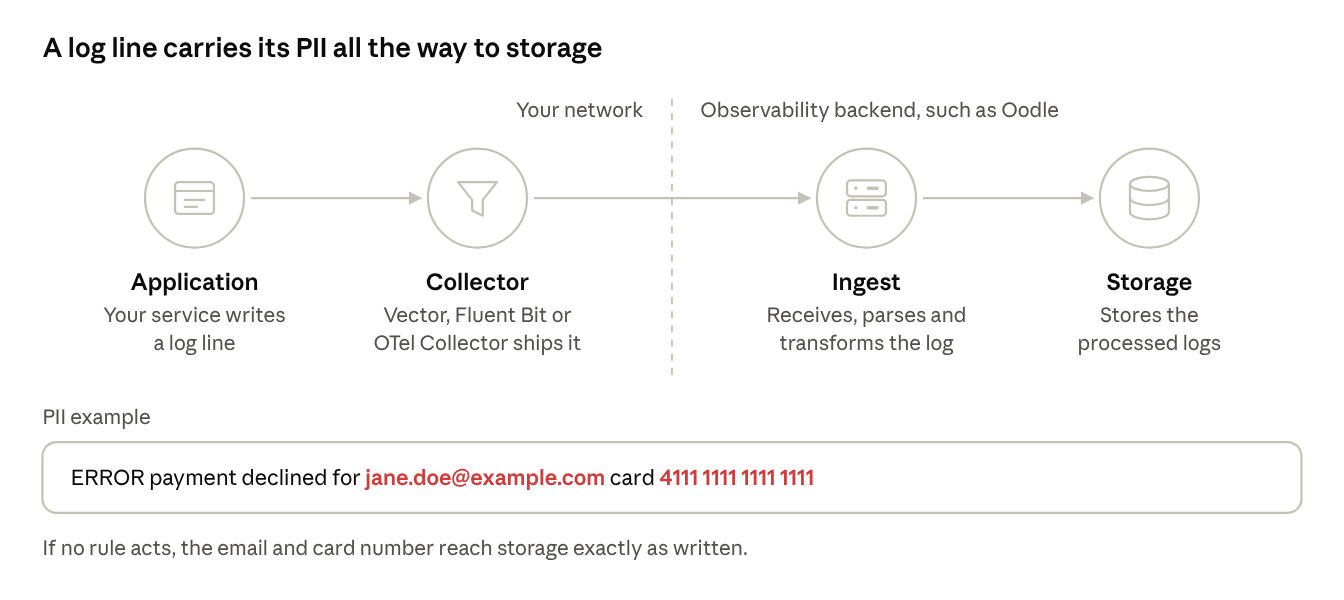
A telemetry pipeline moves data from sources to destinations, and processors change the data on the way. For this post, consider four stages.
- Source. Your service writes a log line. The line may hold PII by mistake.
- Collector, at the edge. An agent such as Vector, Fluent Bit or the OpenTelemetry Collector reads the logs and sends them on. It runs in your network, before the data leaves it (egress).
- Ingest pipeline. The observability backend, such as Oodle, receives the logs, parses them and transforms them. Up to this stage, the data is in flight.
- Storage. The backend stores the processed logs. From now on, the data is at rest.
What is redaction?
Redaction removes the PII from a log and keeps the rest. The log still tells you what happened, but not who it happened to.
Before: DEBUG signup failed user={"email":"jane.doe@example.com","ssn":"123-45-6789","ip":"203.0.113.7"}
After:  DEBUG signup failed user={"email":"[EMAIL]","ssn":"[SSN]","ip":"[IP]"}
What you can do with PII
You have three controls.
- Redact it. Replace the value with a fixed word, such as
[EMAIL]. The value is gone for good. This is the safest control, and it applies data minimization directly. - Restrict access to it. Keep the value, but let only a few people see those logs. Use this when a team needs the data for its work. This applies least privilege.
- Replace it with a token. Swap the value for a random word, and keep the mapping from word to value in a secure vault. People with access to the vault can get the value back. This is often called tokenization.
Three places you can act
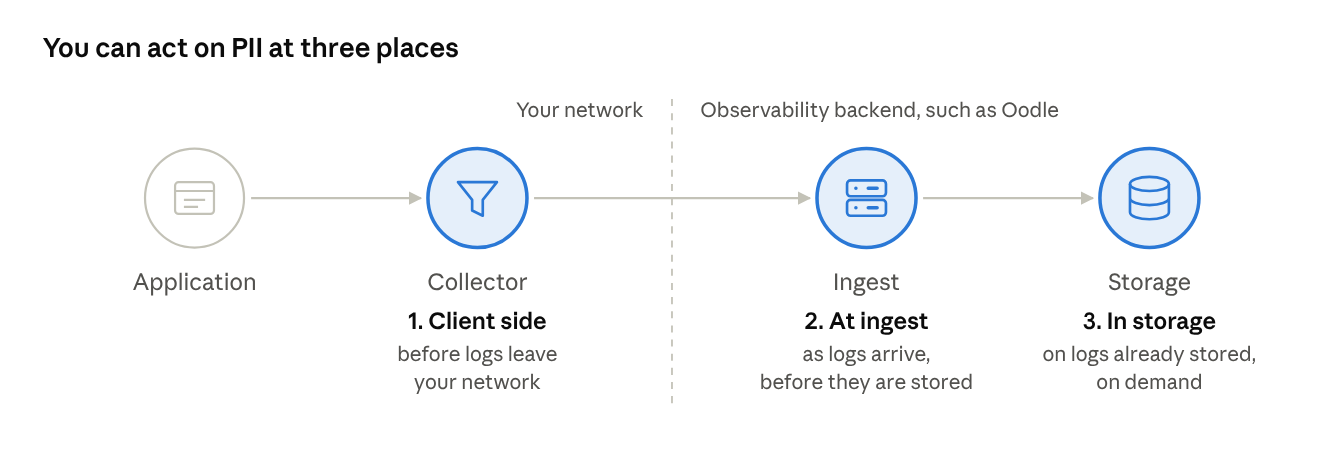
- At the edge. Processors run in your collector, before the logs leave your network. Data that never leaves cannot leak from the backend, and cannot cross a border.
- In the ingest pipeline. Processors run as the backend receives logs, before it stores them. One set of rules covers every source, including sources whose code you do not own.
- At rest. You act on logs that are already stored. This is how you fix a leak that no rule caught, and how you answer a request to erase a person's data. In Oodle, this is on demand.
Pick the place by where the data is allowed to go, and by who should own the rules.
Four controls for Pinecart
Each event in Pinecart's story needs its own control, at its own stage.
| Event | Control | Risk it reduces |
|---|---|---|
| A debug line writes full user records | Redact in the ingest pipeline | Exposure of PII to every reader of the logs |
| A new region sends EU logs to the US | Redact at the edge | Cross-border transfer of personal data |
| A late discovery of a month of stored records | Redact or delete at rest | Old copies that new rules do not change |
| Data kept on purpose for the fraud team | Restrict access by label | Access by people who do not need the data |
- A debug line: redact in the ingest pipeline. First, Pinecart must stop more customer records from being stored. The same debug mistake can happen in any service, and each service has its own collector. A copy of the rules in each collector is hard to keep the same. So Pinecart sets up the rules once, in the ingest pipeline.
- A new region: redact at the edge. A rule in the ingest pipeline runs in the US, after the EU logs have left the EU. So for the EU sign-up service, the PII must be removed in the collector, before the logs leave.
- A late discovery: redact at rest. The
userobject was in the logs for a month before anyone saw it. The new rules do not change those stored logs. So Pinecart finds them in storage, and redacts or deletes them. - Data kept on purpose: restrict access. Not all PII should go. The fraud team needs the IP address and device ID in user activity logs. Other engineers do not. So Pinecart keeps these values, labels the logs, and limits who can see them.
What Oodle covers
Oodle gives you the controls at all three places.
- At the edge: Oodle gives you redaction rules to run in your collector.
- In the ingest pipeline: PII redaction rules mask data as Oodle receives logs. A rule can also label sensitive logs, so you can restrict access to them.
- At rest: on demand, we find stored logs with PII and redact or delete them. Access restrictions limit who can see labelled logs.
It all starts on the PII Redaction page. Choose New, then pick where to handle the data.
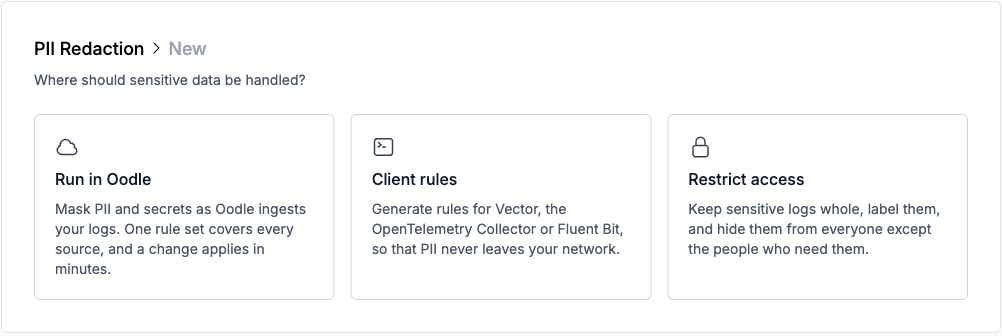
The next sections show how Pinecart sets up each control in Oodle.
1. Redact in the ingest pipeline
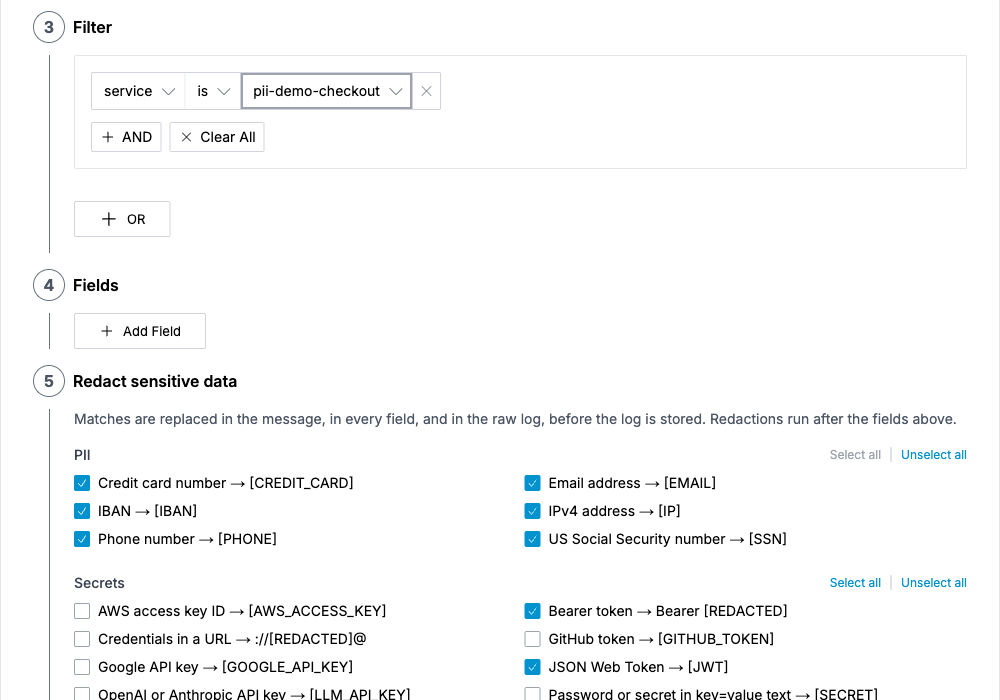
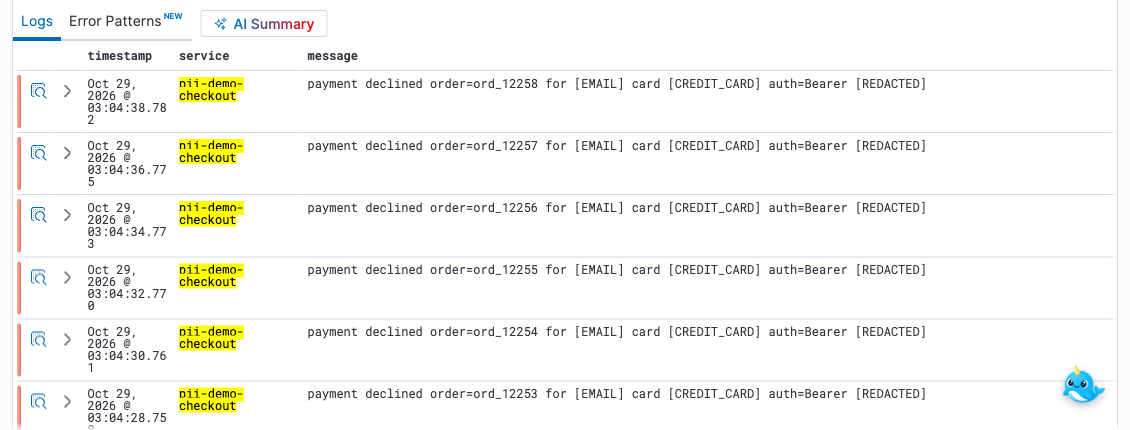
To stop the debug line from storing more customer records, Pinecart adds a rule in Oodle. PII redaction rules run as logs arrive, before they are stored. One rule covers every source that sends logs to Oodle, and you change it in one place.
On the PII Redaction page, choose New, then Run in Oodle. The common PII rules come ticked. Add a filter to choose which logs the rule applies to. The example below covers the checkout service, and it also masks bearer tokens and JWTs. For Pinecart, the filter matches the sign-up service. Logs that arrive after the rule is saved are masked in the message and in every field.
2. Redact at the edge
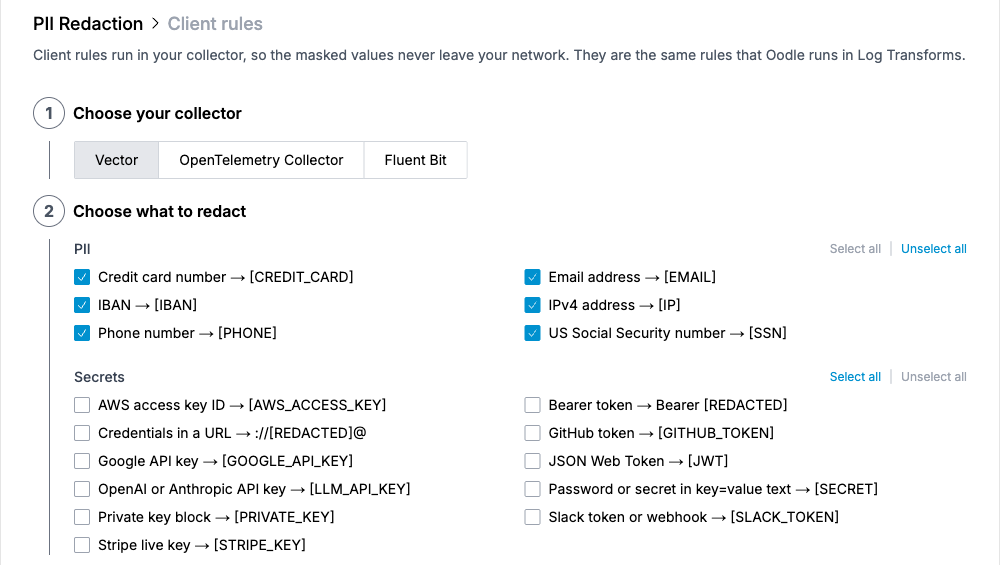
The ingest rule runs after the logs reach Oodle. Pinecart's EU sign-up logs must be clean before they leave the EU, so this rule runs in the collector. Oodle works with the collector you already run: Vector, Fluent Bit or the OpenTelemetry Collector. Oodle gives you the rules, and your collector runs them as processors, so the PII never leaves your network.
On the PII Redaction page, choose New, then Client rules. Pick your collector and the types of PII to redact, and Oodle writes the config. You can paste it in yourself, or copy a prompt that tells your coding agent to add it. For a log format of your own, add a custom rule with a regex, or let Oodle AI write one from a sample line.
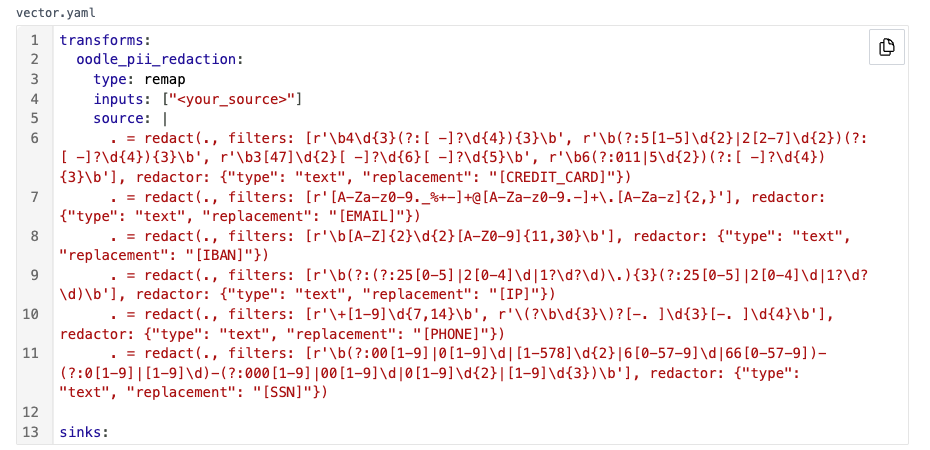
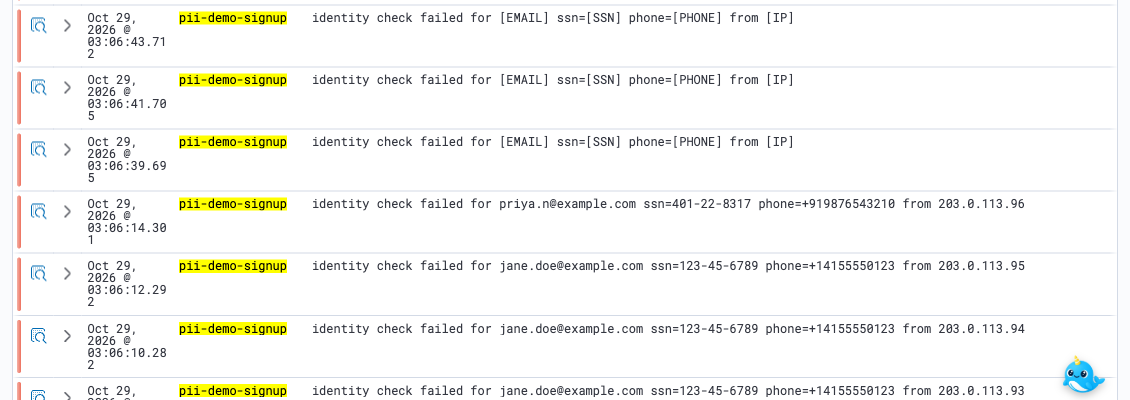
After the EU sign-up service's Vector got the new config, its logs arrived with the email, SSN, phone number and IP already masked. The older lines at the bottom still show the raw values.
Coming next: an Oodle-managed pipeline worker that runs in your network. It sits between your collectors and Oodle's backend, so you can change edge rules from Oodle without editing each collector.
3. Redact at rest
A rule only changes logs that arrive after the rule is live. Pinecart's month of sign-up logs with the user object was stored before the rules, so it must be fixed in storage. Oodle does this on demand.
- Tell us which service leaked, the time range, and what the value looks like, for example the
signup failedmessage. - We find the matching logs in storage, and redact the values or delete the logs.
- You add a redaction rule, so that new logs are masked as they arrive.
The same steps apply when a person asks you to erase their data.
4. Restrict access to sensitive logs
The fraud team needs the real IP addresses and device IDs. So Pinecart keeps the values, and limits who can see them. This takes two steps.
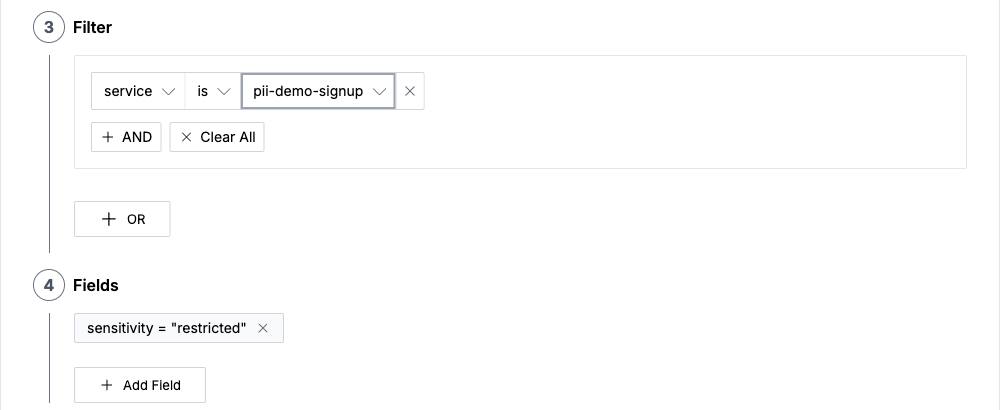
- Label the logs. On the PII Redaction page, choose New, then Restrict access. Add a filter that matches the user activity logs. Oodle adds the label
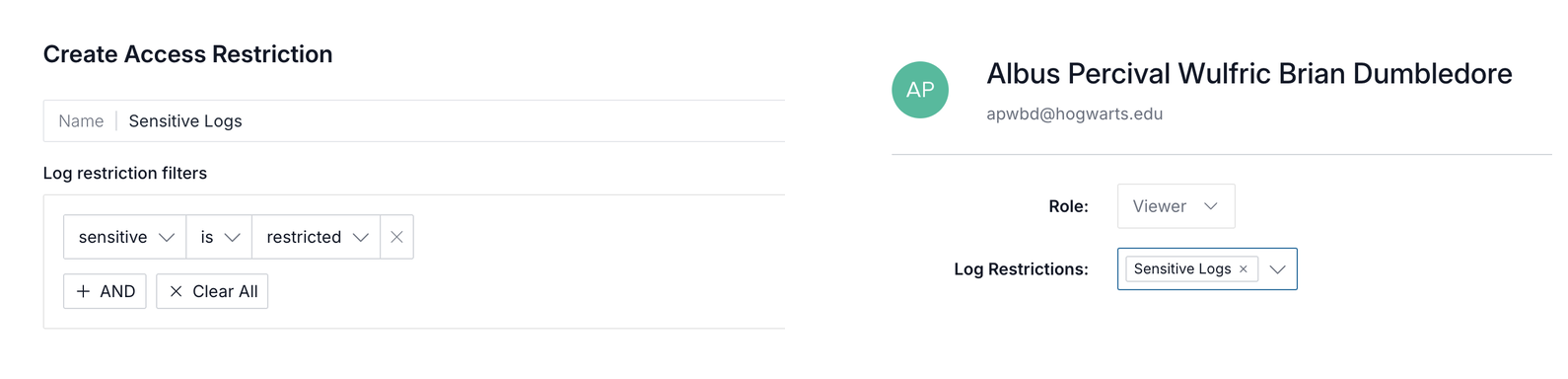
sensitivity = restrictedto each matching log. - Limit who can see them. Create an access restriction on the label, and set it on each user. For example, only the fraud team sees the user activity logs.
Where to start
PII in logs is easier to stop than to clean up. Use this list to start.
- Find it. Search your logs for emails, card numbers and tokens. Look first at services that handle users or payments.
- Stop new leaks. Turn on the built-in PII rules in the ingest pipeline for those sources, and check their next logs.
- Keep data in its region. For data that must not leave a region or your network, move the rules into the collector at the edge.
- Clean up. Ask us to redact or delete the PII that is already stored.
- Limit the rest. Label the few logs that must keep their values, and restrict who can see them.